
When Does Layout Start? Earlier Than You Think.

Using Dusty doesn't mean you have to do Multi-Trade Layout. There’s still a ton of value in using Automated Layout technology to lay out a single trade’s scope of work — speed, accuracy, and more.
If you’re just laying out one trade, this blog post isn’t for you
If you’re just laying out one trade and you know what you’re doing, you can get your layout file prepped in a week or two and be out on the jobsite with the robot, rocking and rolling. Experienced Dusty users prep for single-trade layout in mere days.
If it’s your team’s first time using Dusty, we recommend more lead time so that your VDC team can learn the file prep process and your operator can learn to run the robot. For most teams, four weeks is comfortable.
Many of our customers start with a single-trade workflow, and then evolve to Multi-Trade Layout. That’s the subject of the rest of this post.
If you’re doing Multi-Trade Layout, you need to get started early
Multi-Trade Layout further expands the value you get from layout in all the ways we’ve discussed earlier in the series, offering unparalleled levels of alignment and risk mitigation. But one of the implications is that layout isn't just a field activity any more — it’s a coordinated digital deliverable that is produced as an extension of the VDC process. That deliverable is the work product of multiple stakeholders. And that means it needs to be scheduled accordingly.
This post walks through when the Multi-Trade Layout workflow really begins, and how to schedule for it. You’ll also learn how to know if you’re too late to implement Multi-Trade Layout on a job that’s already rolling.
Layout is a milestone — not a task
A task is a discrete chunk of work. It has a start and end. It’s something you assign to one party.
A milestone, on the other hand, is a point in time when multiple things come together, from multiple parties, to enable the next phase of the project.
Traditional layout is treated like a task
“Layout will start after the slab is poured. Subcontractor X will do it.” That assumption buries risk in the schedule. Each trade shows up, does their piece, and leaves — without alignment. That’s a great recipe for rework, delays, and conflict.
Multi-Trade Layout is a workflow culminating in a milestone
In Multi-Trade Layout, layout becomes a shared, coordinated deliverable. It can only be achieved as the outcome of a process in which the trades and GC work together to:
- Agree on the layout scope
- Define each party’s responsibilities in the workflow
- Each prepare, contribute, and align their respective layout files
- Each review and sign off on the coordinated layout
- Agree on and lock timing for printing layout onsite
If any of that isn’t done, you haven’t reached the milestone. You can’t just “do Multi-Trade Layout.” You have to prepare for it — just like you’d prep for a pour or a key inspection. Layout becomes a shared goal that requires multiple dependencies to be resolved.
A realistic Multi-Trade Layout timeline
So how do you achieve that milestone? Let’s look at the process — but remember everything we’ll discuss below applies to Multi-Trade Layout. If you’re starting out with single-trade layout, as many Dusty customers do, your workflow will be simpler and considerably shorter.
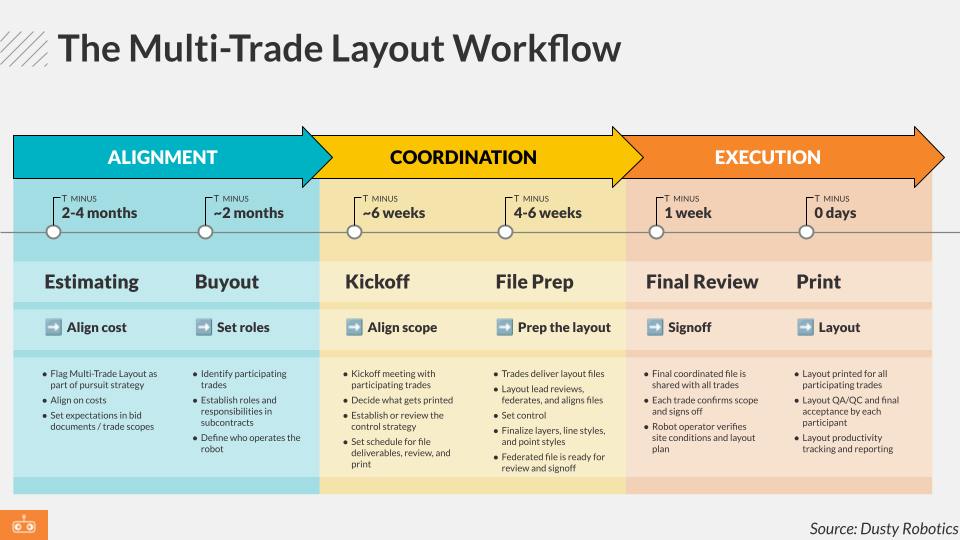
Want a printable copy of this?
Estimating and Bidding: 2-4 months (or more) before layout
This is where Multi-Trade Layout really begins — long before anybody with a tape measure on their belt is walking around on the jobsite.
- Flag Multi-Trade Layout as part of your pursuit strategy. (And, don’t forget to leverage it as a key value-add. The Owner is investing big in your VDC process. Multi-Trade Layout is how you make sure the ROI shows up on-site.)
- Align with VDC and Estimating on the time and cost of coordination and file prep.
- Set expectations for Multi-Trade Layout participation in bid documents and trade scopes. (For contract language that makes Multi-Trade Layout responsibilities explicit, see part 8 of this series.)
Buyout: ~2 months before layout
Get ahead of “surprise” coordination issues by assigning layout responsibilities clearly up front.
- Confirm which trades are participating in Multi-Trade Layout. (For more on this decision, see part 4 of this series.)
- Write file prep, signoff, and QA responsibilities into subcontracts as those trades are bought out.
- Define who buys out the robot, who will operate it, and owns layout-day execution.
"We knew we had to get buy in from our trade partners very early in the project for this to be successful. Together, we could plan how to get the most value of Dusty and figure out how to do this from a Multi-Trade perspective."


Kickoff and Scope Alignment: ~6 weeks before layout
Bring all layout participants together and align on what success looks like.
- Hold a kickoff meeting with participating trades.
- Decide what gets printed. (For guidance, see part 4 of this series.)
- Establish or review the control strategy for the project. (For more on this, see Understanding Control in Construction Layout: Methods, Pros, and Cons.)
- Set a detailed schedule for: file deliverables from each trade, review, and print day(s).
Trade File Prep and Coordination: 4-6 weeks before layout
Each trade submits their layout files — and they’re combined into a shared deliverable.
- Trades deliver .dwg or .csv layout files.
- The layout coordination leader reviews, federates, and aligns files in Dusty Portal (a cloud-based, collaborative solution for coordinating your layout).
- If your control isn’t already set on-site, get it done now. The party responsible for setting control delivers a .csv point file documenting control, and that file also gets layered into the federated layout.
- Finalize layers, line styles, and point styles.
- The federated layout is now ready for review and signoff.
“With Dusty, we’ve brought the complete BIM model into reality. It’s created a level of trust and reliability through all the different transitions in the digital landscape and then into construction. When you involve everyone on the project—whether it's the mill worker, the exterior glass team, or the MEP tradespeople—you really see the value. If you want project timelines to shrink and improvements in quality and safety, you need to implement Dusty. There’s no downside—it’s all positive.”


We’ll have more guidance for VDC teams driving this phase of the process in an upcoming post.
Final Review and Signoff: ~1 week before layout
No surprises on print day. Get everyone’s approval ahead of time.
- Final coordinated file is shared with all trades via Dusty Portal.
- Each trade confirms and signs off on their layout scope.
- Robot operator verifies site conditions and layout plan.
Layout Execution: Print Day
All of the prep and coordination pays off, and the plan becomes a reality — fast.
- On site, the layout is printed in a single pass for all participating trades Dusty’s FieldPrinter 2 robot.
- Layout QA/QC and final acceptance by each participant trade.
- In the trailer and back at the home office, layout productivity is tracked in real-time using Dusty Portal. Reporting shows how much of the layout is complete, and how robot time distributes across trades.
Stay tuned for a future post with more execution guidance for field teams.
What could Multi-Trade Layout mean for your next project?
Sniff Test for Projects Already Underway
Real talk: In a perfect world, you know layout’s part of the job from the start.
In reality? Sometimes the decision to add Multi-Trade Layout happens midstream.
Here’s how to think through it:
First, consider single-trade layout with Dusty
As we said at the top — there’s still a ton of value in laying out a single trade with Automated Layout technology, and the workflow in that scenario is simpler and faster. Often when teams start considering Automated Layout in the middle of a project, it’s because they need to speed things up. Even if it’s a bit late to start a full Multi-Trade Layout workflow, you may be able to get the schedule compression benefit by using Dusty to accelerate a single key trade (like your framer, for example).
But there’s nothing like Multi-Trade Layout for alignment and coordination across the team. If only Multi-Trade Layout will serve your needs, consider the following.
If you're still bidding:
Ask trades to revise their bids to include an alt-add for Automated Layout.
If you've already bought out the trades:
Request a change order from affected trades to account for Multi-Trade Layout. (This change order might be deductive, depending on the trade’s roles and responsibilities in the workflow.)
Then pause and ask the hard question: Is there really time to do this right? Here’s the sniff test used by Dusty’s most successful customers:
- You need four weeks minimum for file prep — and those weeks will be busy.
- You need to be contractually aligned with upstream and downstream partners before you can start file prep (that is, before you can get going on that four-week workflow).
- You need to know when layout is required onsite, so you can do the workback schedule analysis and decide if it’s feasible.
If layout happens in ten days and the model isn’t coordinated? Don’t force it. But remember: Dusty’s Automated Layout technology prints 10x faster than typical manual layout. So it’s worth considering whether you could afford to push back the start of layout on-site, to give yourself the needed time for coordination. You could potentially gain that time back in the field.
Don’t treat layout like an afterthought
The best GCs build layout into their schedule — the same way they plan for a pour, an inspection, or an equipment delivery.
They clarify roles and responsibilities. They align the execution of multiple tasks by multiple parties. And they protect the time for coordination.
And by doing that, they turn layout into a competitive advantage — not a scramble.
Don’t miss our next Multi-Trade Layout Best Practices article.
Catch up on our series
This article is #5 in our deep-dive series on best practices for the Multi-Trade Layout workflow powered by Dusty. If Automated Layout is the technology, Multi-Trade Layout is the process, and this series is all about how to do it right. Catch up on the rest of the series below.
Foundations
#1: The Bottleneck That's Costing You Time, Money, and Trust. What's wrong with traditional layout in modern construction?
#2: Multi-Trade Layout: The Construction Workflow That Changes Everything. An introduction to Multi-Trade Layout, how it works, and how it's different.
Workflow Strategy
#3: Four Decisions Every GC Needs to Make to Implement Multi-Trade Layout. Who leads the workflow? What’s in-scope for Multi-Trade Layout? When will all this happen? How will you execute?
#4: What Goes on the Slab? How to Decide Who—and What—Gets Included in Multi-Trade Layout. How to decide what trades to involve. Reimagining what layout can communicate. Deciding what to print.
#5: When Does Layout Start? Earlier Than You Think. (You're reading it!) How to schedule for Multi-Trade Layout — and what to do when the job is already underway.
Implementation
#6: Inside Multi-Trade Layout: Who Does What, and When. Roles and responsibilities. Who does what, and when.
#7: Field communication starts with layout file prep. So does risk management. You can print anything, but it doesn't mean you should print everything. How to make good decisions about what to print while managing layout accountability.
#8: The Contract Language That Makes Multi-Trade Layout Work. Includes free, downloadable contract templates for Multi-Trade Layout: a subcontract Addendum and a Layout Execution Plan. Walks through how they work and how they address the real concerns of GCs and trades considering Multi-Trade Layout for the first time.
Thanks to Wesgroup Properties for the image of Dusty laying out on one of their projects.